









SwissTransfer vs TransferNow – Free, Fast and Secure Transfer of Large Files
SwissTransfer is a file transfer service offered by Infomaniak, allowing you to send large files without creating an account. This page compares SwissTransfer and TransferNow to highlight their features, limitations, and free and paid options depending on different uses.
Comparison updated on .
4.9 / 5 on Trustpilot and Google (20k+ reviews)

SwissTransfer vs TransferNow: comparison of free plans
If you occasionally need to transfer large files, both SwissTransfer and TransferNow offer a free plan that lets you send large files online without requiring registration.
SwissTransfer, operated by Infomaniak, allows sharing of files up to 50 GB per transfer but files can be downloaded only a limited number of times. Files sent with SwissTransfer are available for 15 days, extendable to a maximum of 30 days upon request before they expire. SwissTransfer does not offer tools to request or receive files.
TransferNow, on the other hand, has offered a free solution since 2013 for sending and receiving large files up to 5 GB per transfer, with no limit on frequency or total volume. Shared files remain accessible for 7 days and can be downloaded without any limit on the number of downloads.
Regarding data hosting, TransferNow stores files in France, Europe or in data centers close to the user, depending on their geographical location. SwissTransfer, on its side, hosts transferred files in data centers located in Switzerland.
Password protection for transfers is available on both secure large file transfer services:
- On TransferNow, this feature is available without the need to create a user account, and it’s also possible to edit or delete the password of an active transfer.
- Swiss Transfer also offers password protection for transfers, but it’s not possible to edit or delete a previously added password.
Finally, TransferNow includes additional features in its free plan for sharing files online, such as file preview and streaming (images, videos, and PDF documents), customizable download links, and email notifications (download confirmation, expiration reminders, etc.), even without a user account.
In conclusion, the free SwissTransfer stands out with a high file size limit per transfer, with restrictions on availability duration and download counts, while TransferNow focuses on ease of use, file reception, and tracking features included in its free plan, with a lower maximum file size per transfer.
| Free plans | TransferNow | SwissTransfer |
|---|---|---|
| Max size per transfer | 5 GB | 50 GB |
| File availability | 7 days | 15 days (extendable to 30) |
| Transfers per day | Unlimited | 500 |
| Max number of downloads | Unlimited | 250 |
| Password protection | Yes | Yes |
| Customizable links | Yes | No |
| File preview | images, videos, audio files, PDF documents | images |
Sources:
https://www.infomaniak.com/fr/support/faq/2451/guide-de-demarrage-swisstransfer-envoi-securise-et-gratuit-de-gros-fichiers
https://www.swisstransfer.com
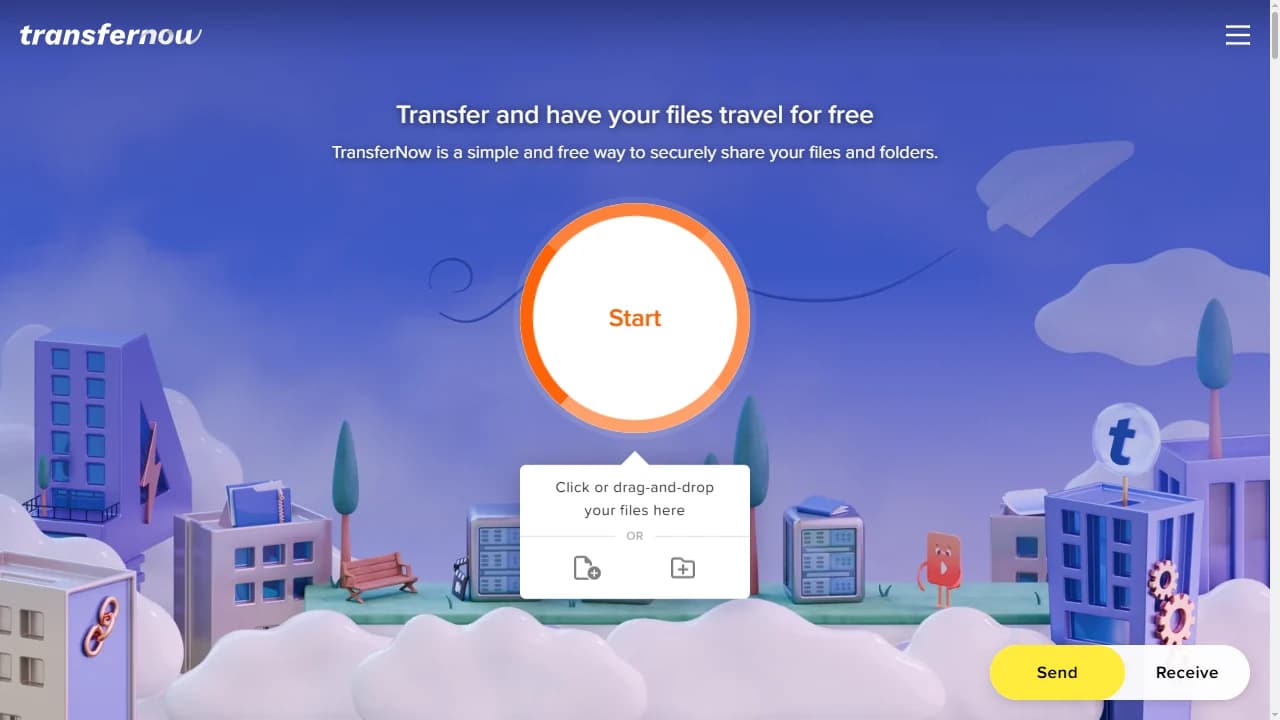
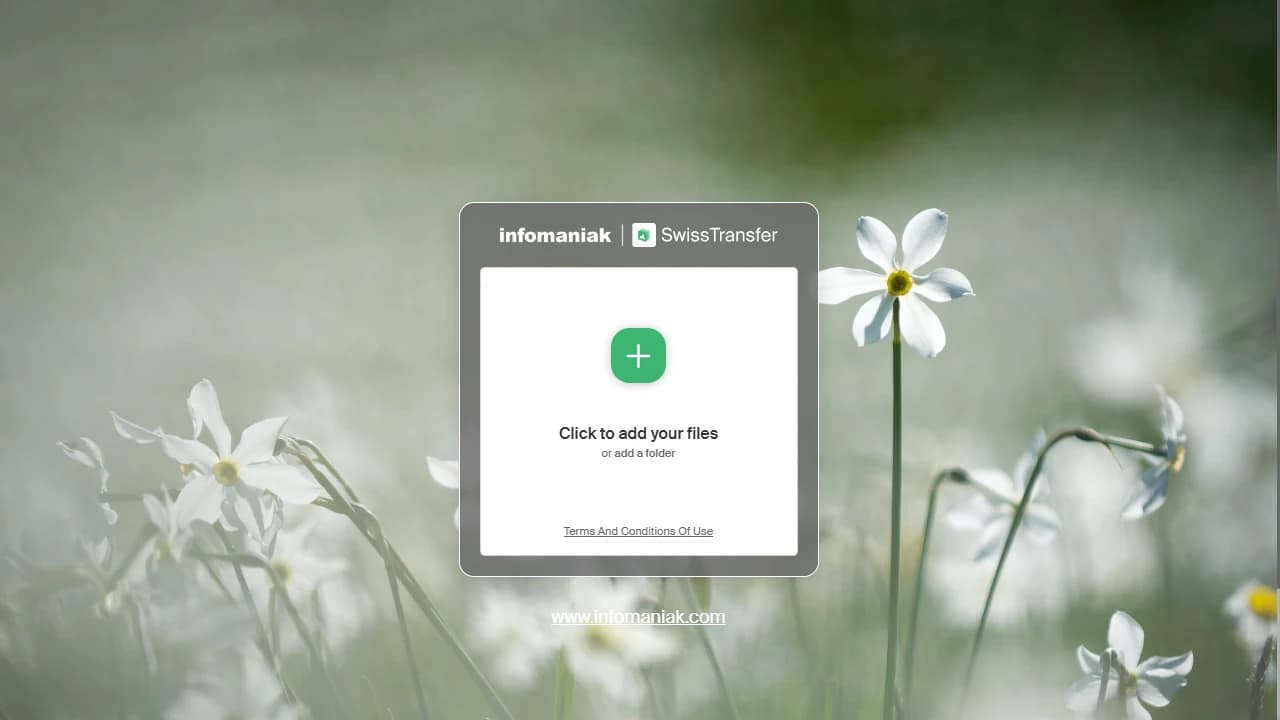
Compare the homepage interface of SwissTransfer and TransferNow
This visual comparison presents the home interfaces of SwissTransfer and TransferNow, as displayed during the initial loading of the service. It allows observation of the general page layout, the arrangement of key elements, and how each interface guides the user toward large file transfer features.
The homepage is a key part of the user experience for a file transfer service. It influences immediate understanding of possible actions, readability of available options, and how quickly a user can send or receive files without intermediate steps.
This visual comparison makes it possible to assess:
- the organization and hierarchy of elements on the homepage,
- direct access to file send and receive features upon arriving at the service,
- the visibility of essential actions without immediate account creation,
- the coherence of the interface and user experience across desktop, tablet, and mobile.
The comparative visual highlights the ergonomic and presentation differences between the home interfaces of SwissTransfer and TransferNow. It shows how each service structures its interface to facilitate large file transfers, both for occasional and more regular use.
SwissTransfer vs TransferNow: compare our pricing and plans tailored to every need
SwissTransfer focuses exclusively on a free large file transfer offer and does not currently offer paid plans or advanced features for professional use.
On the other hand, TransferNow offers a complementary suite of paid plans to enhance its free service. These plans are intended for both individual users and teams or organizations with more advanced large file transfer needs.
The paid plans from TransferNow allow you to increase the maximum file size per transfer, extend file availability duration, and access additional features such as transfer management, advanced link customization, detailed download tracking, and file reception through dedicated links.
For professional and collaborative use, TransferNow also offers multi-user plans with team management features, differentiated access rights, and options suited for shared work environments. These plans are aimed at enterprises, agencies, or teams looking to centralize and secure their large file transfers.
In summary, SwissTransfer lacks paid offers or advanced professional features, while TransferNow positions itself as a scalable solution, combining a free offer and multiple paid plans tailored to personal, professional, or collaborative use.
| Paid plans | TransferNow | SwissTransfer |
|---|---|---|
| Premium plan – 1 month | 10 € /month | No |
| Premium plan – 1 year | 8 € /month | No |
| Premium plan – 2 years | 6 € /month | No |
| Team plan – 1 month10 user accounts included | 30 € /month/total | No |
| Team plan – 1 year10 user accounts included | 24 € /month/total | No |
| Team plan – 2 years10 user accounts included | 18 € /month/total | No |
| Enterprise plan | custom plan | No |
Prices are shown excluding VAT.
Sources:
https://www.transfernow.net/en/prices
https://www.transfernow.net/en/features
SwissTransfer vs TransferNow: compare our customization features
Customization features can play an important role in choosing a large file transfer service, especially for professional use or recurring exchanges with clients and partners.
SwissTransfer offers a simple and clean interface, focused on one-time large file transfers. The service does not offer advanced customization features for transfers or download pages; the generated links remain standard and identical for all users.
TransferNow, on the other hand, includes several customization options, available from the free plan and extended in the paid plans. It is possible to customize download links, add visual elements, and configure certain settings related to the file reception experience.
For users with a paid plan, TransferNow also allows for deeper customization, with options tailored to professional needs, such as adding a visual identity, customizing download pages, and aligning transfers with the company’s brand.
In summary, SwissTransfer favors a minimalist approach without customization options, whereas TransferNow offers customization features that adapt the large file transfer experience to individual or professional uses.
| Overview of main features | TransferNow | SwissTransfer |
|---|---|---|
| Custom subdomain | Yes | No |
| Integration of your logo, background and colors | Yes | No |
| Download page customization | Yes | No |
| Download link customization | Yes | No |
| Enterprise domainCNAME record | Yes | No |
Sources:
https://www.transfernow.net/en/features
SwissTransfer vs TransferNow: compare our features to receive files
The ability to receive files can be a key factor, especially for professional or collaborative use, or when several people need to send documents to the same recipient.
SwissTransfer is designed solely for sending large files. The service does not offer a dedicated feature to create an upload link for receiving files from third parties. Users can only generate download links for files they send themselves.
TransferNow, on the other hand, offers a specific feature that allows you to receive files via a dedicated link. This option enables one or more senders to upload files directly into a receiving space, without needing to create an account. This feature is available with the free plan, with additional options available in paid plans.
TransferNow’s paid plans go further in file reception, notably by customizing upload links, setting security rules, tracking received files, and centralizing transfers in a dedicated management space. These features are especially suitable for teams, freelancers, or enterprises that regularly receive files from clients or partners.
In summary, SwissTransfer does not offer a solution to receive files, while TransferNow includes dedicated features for receiving large files, suited to both occasional and recurring professional use.
| Overview of main features | TransferNow | SwissTransfer |
|---|---|---|
| Request and send a secure upload link via email to receive files | With TransferNow, you can request files by email from your contacts without needing to create a user account.Yes — With TransferNow, you can request files by email from your contacts without needing to create a user account. | No |
| Creation of custom secure upload links | With TransferNow, you can create a secure upload link to share with your contacts, without needing to create a user account.Yes — With TransferNow, you can create a secure upload link to share with your contacts, without needing to create a user account. | No |
| Share link to receive files directly to your account | Yes | No |
| Widgets to receive files from your website | Yes | No |
Sources:
https://www.transfernow.net/en/features
SwissTransfer vs TransferNow: compare our apps and extensions
The availability of apps and extensions can facilitate large file transfers and improve service integration into daily workflows, particularly in professional environments.
SwissTransfer only provides a mobile app that allows large file transfers from a smartphone. The service does not provide a browser extension, email add-in, or desktop app to automate or simplify transfers from a workstation.
TransferNow offers a broader range of tools to support various use cases. In addition to its web interface, the service provides an Outlook add-in, a browser extension (Chrome), as well as desktop and mobile apps. These tools allow users to send and receive large files directly from their usual work environments, without necessarily going through the website.
TransferNow apps and extensions are designed to suit both personal and professional uses, simplifying file sending from an email client, browser, or desktop, as well as file reception and transfer tracking.
In summary, SwissTransfer limits its application offering to a mobile app, whereas TransferNow offers a set of apps and extensions covering major work environments to make large file transfers easier on desktop, mobile, and email.
| Tools and managers | TransferNow | SwissTransfer |
|---|---|---|
| Mobile appsAndroid, iOS | Yes | Yes |
| Desktop appsWindows, macOS, Linux | Yes | No |
| Outlook add-inWeb, Desktop | Yes | No |
| Browser extensionsChrome (Gmail) | Yes | No |
Sources:
https://www.infomaniak.com/fr/support/faq/1575/resoudre-un-probleme-de-lapp-mobile-swisstransfer
https://www.transfernow.net/en/apps
SwissTransfer vs TransferNow: compare our multi-user plans
Multi-user plans address specific needs, particularly for teams, enterprises or organizations that need to manage large file transfers collaboratively and in a structured way.
SwissTransfer does not offer multi-user plans or features dedicated to team collaboration. The service is designed for individual and occasional use, without user accounts, user management, or shared workspaces.
TransferNow, on the other hand, offers multi-user plans included in its paid plans. These plans allow organizations to create and manage multiple user accounts, with features tailored for collaborative use.
TransferNow’s multi-user plans include user management, rights and permissions assignment, transfer centralization, and activity tracking for both sending and receiving files. These features help teams better organize their large file exchanges and secure access by defined roles.
In summary, SwissTransfer does not provide multi-user plans, whereas TransferNow offers solutions tailored for teams and enterprises, with integrated management and collaboration features.
| Tools and managers | TransferNow | SwissTransfer |
|---|---|---|
| User management | Yes | No |
| Single sign-on (SSO) | Yes | No |
| Provisioning, synchronization (SCIM) | Yes | No |
| User group management | Yes | No |
| Tracking and management of transfers made by your users | Yes | No |
| File reception management for your users | Yes | No |
Sources:
https://www.transfernow.net/en/prices
https://www.transfernow.net/en/discover/transfernow-premium
https://www.transfernow.net/en/discover/transfernow-team
https://www.transfernow.net/en/discover/transfernow-enterprise
SwissTransfer vs TransferNow: compare the security for your files
SwissTransfer – security for file transfers
SwissTransfer implements security measures to protect files during transfer and temporary storage. Exchanges are secured through SSL/TLS encryption and files are hosted in data centers located in Switzerland.
Security features available with SwissTransfer:
- SSL/TLS encryption for file transfers,
- password protection for download links,
- server-side file encryption (AES-256).
SwissTransfer does not publicly communicate about implementing antivirus scanning of transferred files. The service also does not offer encryption with a user-provided key (SSE-C) or any feature to choose the file storage region.
TransferNow – enhanced security from the free plan
TransferNow includes multiple layers of security available from the free plan, with additional options available in paid plans.
Security features offered by TransferNow:
- password protection available without account creation, even for anonymous transfers,
- SSL/TLS encryption for transfers and server-side file encryption (AES-256),
- automatic antivirus scanning of all transferred files to detect and block malicious content,
- advanced encryption with a user-provided key (SSE-C), available in advanced plans,
- the ability to choose the file storage region (France, Europe, Americas, Asia, or the user’s continent).
Both SwissTransfer and TransferNow apply common security standards for large file transfers, including encrypted exchanges and password protection. SwissTransfer takes a simple approach limited to essential features, while TransferNow provides more extensive security mechanisms, including antivirus scanning, advanced encryption and data location choice, especially suited for professional use.
| Security | TransferNow | SwissTransfer |
|---|---|---|
| SSL/TLS encryption | Yes | Yes |
| Password protection for transfers | Yes | Yes |
| File encryption (AES 256) | Yes | Yes |
| Antivirus scanning of transfers | With TransferNow, files are automatically scanned for malicious content, even with the free plan.Yes — With TransferNow, files are automatically scanned for malicious content, even with the free plan. | No |
| File encryption (SSE-C) | Yes | No |
| Choose in which region of the world the files are stored | Yes | No |
Sources:
https://www.infomaniak.com/fr/support/faq/1755/comprendre-la-securite-des-donnees-swisstransfer
https://www.transfernow.net/en/explore/security
https://www.transfernow.net/en/explore/infrastructure-technology
https://www.transfernow.net/en/explore/personal-data
SwissTransfer vs TransferNow: compare our public APIs for transferring files
Public APIs allow the automation of large file transfers and the direct integration of these features into business tools, applications, or existing workflows.
SwissTransfer does not offer a public API for automating the sending, receiving, or management of file transfers. The service is designed for manual use via its web interface and does not provide integration mechanisms intended for developers or application environments.
TransferNow, on the other hand, offers a public API to automate large file transfers. This API allows you to create transfers, send and receive files, manage security settings (availability period, password), and retrieve information related to transfers and downloads.
The TransferNow API is intended for professional and technical use, such as integration into internal applications, production tools, collaborative platforms, or content management systems. It is publicly documented and accessible under the conditions defined by the service provider.
In summary, SwissTransfer does not provide a public API for file transfers, whereas TransferNow offers an API to automate and integrate large file transfers into technical or professional environments.

Comparison date: July 30, 2026
https://www.transfernow.net/en/discover/transfernow-api-sdk
They used SwissTransfer, now they use TransferNow
Data collected from the independent review platform Trustpilot (last review check on July 30, 2026).
When comparing file transfer services, numbers alone aren’t enough to give the full picture. User reviews provide valuable insights into real-life experiences, highlighting both frustrations and strengths. As of July 30, 2026, SwissTransfer has around 120 reviews on Trustpilot with an average rating of 3.4/5, while TransferNow has 20k+ reviews across Trustpilot and Google with an average rating of 4.9/5.
Sources:
https://www.trustpilot.com/review/www.swisstransfer.com
https://fr.trustpilot.com/review/transfernow.net
TransferNow or SwissTransfer? Answers to your frequently asked questions
What is SwissTransfer?
SwissTransfer is a file transfer service offered by Infomaniak. It allows sending large files online without creating an account.
Is SwissTransfer free?
SwissTransfer offers a free service for sending large files. However, some limitations may apply, such as transfer volume, number of downloads, or available features.
What are the main limitations of SwissTransfer?
SwissTransfer has several limitations, such as a capped number of daily transfers, limited downloads per transfer, no dashboard, and restricted tracking options. The service also lacks advanced features intended for professional use.
Is SwissTransfer secure?
SwissTransfer uses security mechanisms to protect file transfers, including data encryption. Files are hosted in Switzerland, in accordance with Infomaniak’s infrastructure practices.
What is an alternative to SwissTransfer for regular use?
For regular or professional use, solutions like TransferNow offer additional features such as transfer tracking, dashboards, customization options, and plans tailored to different needs.
What’s the difference between TransferNow free and SwissTransfer free for sending files?
TransferNow free allows sending up to 5 GB per transfer without registration and no frequency quota. SwissTransfer free allows file transfers up to 50 GB per transfer, with limits on availability time and number of downloads.
Can large files be sent for free with TransferNow or Swiss Transfer?
Yes. TransferNow allows you to send large files for free up to 5 GB per transfer, without creating an account.
SwissTransfer also offers a free service for sending large files up to 50 GB per transfer, with limits on availability duration and download count.
How can access to a file transfer be protected by a password on SwissTransfer and TransferNow?
On TransferNow, it’s possible to protect a transfer with a password, even without an account, and to modify or delete this password as long as the transfer is active. SwissTransfer also offers password protection for transfers, without account creation.
Is it possible to receive files from contacts with SwissTransfer or TransferNow?
TransferNow allows receiving files via a secure upload link or by email, with or without an account, and also offers integration options.
SwissTransfer does not offer a dedicated feature to receive files via an upload link.
Is file transfer encrypted on SwissTransfer and TransferNow?
Yes, both services use TLS/SSL encryption for file transmission and AES-256 encryption for storage. TransferNow also offers optional server-side encryption with a personal key (SSE-C), available in certain plans.
Can you choose where files sent via TransferNow or SwissTransfer are stored?
TransferNow allows selection of the storage region (for example France, Europe, America, or Asia). SwissTransfer hosts files in data centers located in Switzerland, without the option to choose the location.
Are file transfers scanned for viruses on SwissTransfer and TransferNow?
TransferNow automatically scans all uploaded files, including in the free plan. Swiss Transfer does not publicly disclose systematic antivirus scanning of transferred files.
Are there multi-user plans to manage team transfers with SwissTransfer and TransferNow?
TransferNow offers a Team plan including multiple user accounts, as well as plans tailored to teams and enterprises. SwissTransfer does not provide multi-user plans or team management features.
Is there an API to automate sending large files with SwissTransfer and TransferNow?
TransferNow offers a public REST API to automate large file transfers and integrate it into tools or services.
SwissTransfer does not provide a public API to automate sending or managing file transfers.
Can the file transfer interface be customized on SwissTransfer and TransferNow?
TransferNow offers link and download page customization features, depending on the plan. Swiss Transfer does not offer customization features for the transfer interface.
The information compared on this page is based on publicly known features of the relevant services at the indicated date.
This page is not affiliated with SwissTransfer. The mentioned brands remain the property of their respective owners.
Comparison date: July 30, 2026
Sources:
https://www.infomaniak.com/fr/support/faq/admin2/swiss-transfer
https://fr.wikipedia.org/wiki/Infomaniak#SwissTransfer
More comparisons
Compare TransferNow with other services
Guide
The 10 best WeTransfer alternatives
Our complete ranking: free limits, security, file reception — compared service by service.
Read the rankingTransferNow vs
WeTransfer
The best-known transfer service. We compare limits, pricing, file reception, and options — to see how our European alternative stacks up.
See the comparisonTransferNow vs
Filemail
Focused on very large files. We compare maximum sizes, retention periods, and pricing.
See the comparisonTransferNow vs
Send Anywhere
Direct transfer between devices. We compare usage, security, and the limits of each approach.
See the comparisonTransferNow vs
Hightail
The veteran (formerly YouSendIt), aimed at creatives. We compare plans, reception, and collaboration.
See the comparisonTransferNow vs
SendGB
5 GB free but with ads. We compare the experience, customization, and reception.
See the comparisonTransferNow vs
TransferXL
5 GB free with a daily quota. We compare capacity, password protection, and reception.
See the comparisonTransferNow vs
Smash
No size limit on the free tier: we compare the free and paid plans in detail.
See the comparisonTransferNow vs
FTP / SFTP
The historic server protocol. We compare the simplicity of a web link, with no software needed, to setting up FTP access.
See the comparisonTransferNow vs
Dropbox
Cloud storage. For one-off large file sends, we compare the transfer vs. sync approach.
See the comparisonTransferNow vs
Google Drive
Cloud-based sharing. We compare sending large files by link or email, with no account needed for recipients.
See the comparisonTransferNow vs
pCloud Transfer
Simple, free transfers. We compare features, reception, and control over your files.
See the comparisonFind all our comparisons on the alternatives hub.
An intuitive and fast solution designed to secure your large files